HR and payroll software for Qatar on ERPNext, ready for WPS
Akwad Programming sets up ERPNext payroll and HR software (HRMS) for companies in Qatar, from our office in Doha. Employee records, attendance, leave, overtime and payroll live in one system, the system prepares your WPS salary file, and QID and residence permit records are kept in one place.
What does HR and payroll software on ERPNext include?
ERPNext HR and payroll software covers attendance, leave, payroll and overtime, WPS salary files, QID and residence permit records and end-of-service gratuity in one system. Each part works with accounting and projects, so payroll posts to your books without re-entry.
Attendance
Check-ins from biometric devices, including cloud devices with no local server, or the mobile app, with shifts and late or early marks.
Leave and approvals
Leave balances, requests and approvals with a clear owner and history.
Payroll and overtime
Salary structures, allowances, deductions and overtime calculated from attendance.
WPS salary files
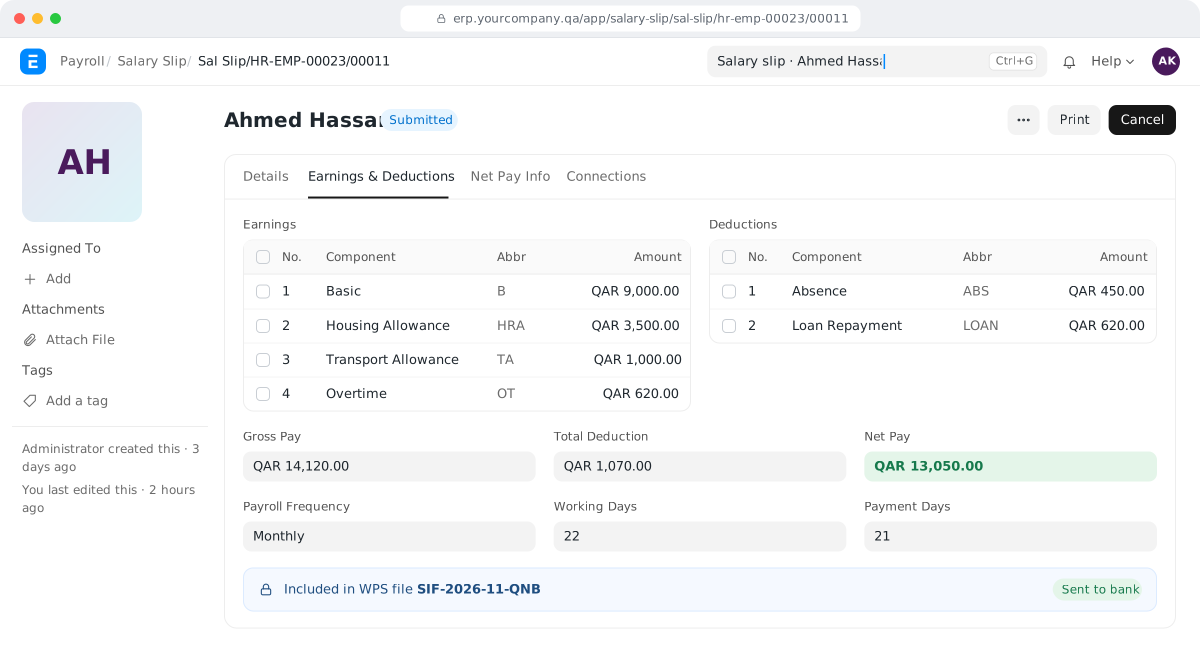
Payroll produces the WPS salary file (SIF) in the layout your bank needs.
QID and residence permits
QID, residence permit and document records for every employee, with expiry dates in view.
End-of-service gratuity
Full and final settlement calculated from service, salary and balances.
Why does ERPNext HR and payroll suit companies in Qatar?
Akwad Programming sets up ERPNext HR and payroll for companies in Qatar with WPS files for any bank, QID and residence permit records, project-based payroll and cloud biometric attendance.
- WPS salary files for QNB, CBQ, QIB, QIIB, Doha Bank or any other bank
- QID and residence permit records
- Project-based payroll for contracting teams
- Attendance from cloud biometric devices, with no local server
- Payslips and the interface in Arabic and English
How does payroll with WPS work in ERPNext?
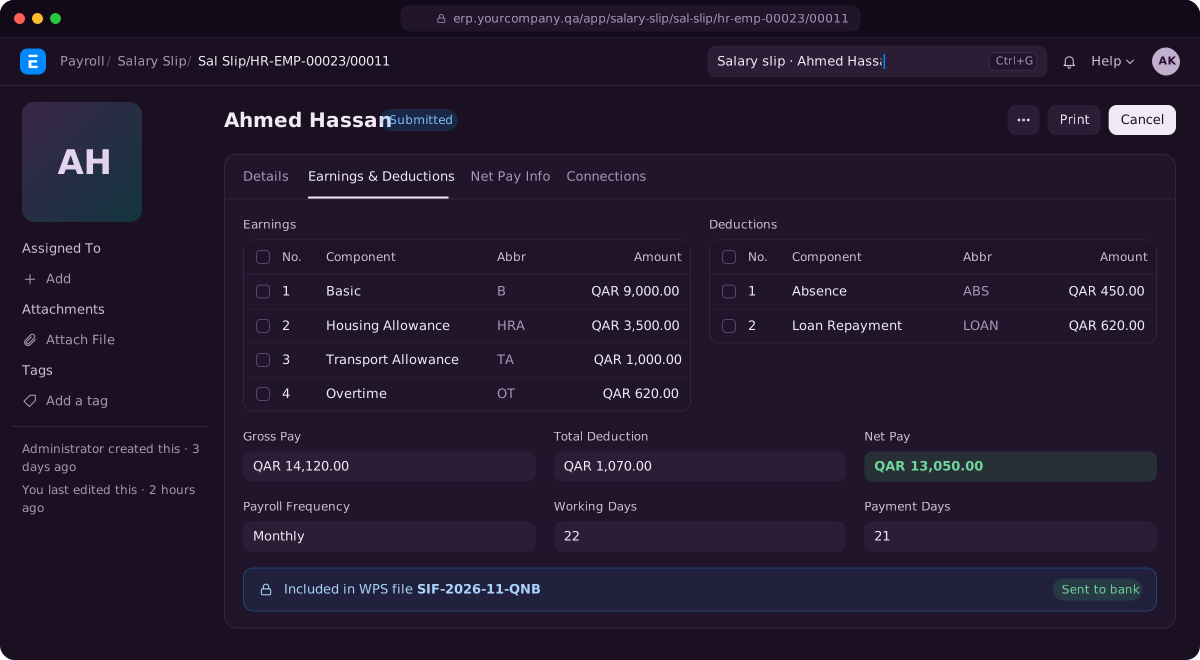
With the WPS export Akwad Programming adds, ERPNext payroll produces the salary file (SIF) for your bank straight from the monthly payroll, which runs from the attendance and leave already in the system. No one has to copy salaries from Excel into the bank’s template, which is where rejected files often start: a wrong account number, a missing ID or totals that don’t match.
A typical month looks like this:
- HR opens the month’s payroll and pulls in employees by company, branch or department.
- ERPNext creates a salary slip for each employee from their salary structure, attendance, leave and overtime.
- HR reviews the slips, fixes anything unusual and approves them all together.
- The system books the salary cost to your ERPNext accounting software and prepares the bank payment entry.
- You download the WPS file in the format your bank requires and upload it to the bank.
HR and payroll in current ERPNext come from Frappe HR, the HR app that installs alongside ERPNext. Frappe HR does not include a Qatar WPS file as standard, which is why we add the export and set it up for your bank. It already works with QNB, CBQ, QIB, QIIB and Doha Bank, and we can set it up for any other bank. How the salary file works, and why banks reject it, is explained in our guide to WPS in Qatar.
How does attendance from fingerprint devices reach payroll?
We connect your fingerprint or other biometric devices so every punch arrives in ERPNext as a check-in, and attendance is marked from those check-ins automatically. HR no longer collects device reports each month and types them into a sheet.
Each employee is matched to the device by their device ID. You define shifts with their start and end times, and ERPNext groups each day’s punches into one attendance record, with late arrivals and early exits marked. Days without a punch show up as absent, so HR follows up the exceptions instead of checking every row.
With ERPNext in the cloud, attendance doesn’t have to depend on a server in your office. Akwad Programming has integrated two cloud attendance devices: the HFSecurity X05 contactless NFC terminal and the FP08 8-inch handheld biometric device. Our middleware and API send each check-in straight to ERPNext HR in the cloud, with no local server.
How do we track QID and residence permit expiry dates?
We add QID, residence permit and passport details with their expiry dates to each employee record, and set reminders that go out a number of days before each date. Today these dates often live in a separate sheet that someone has to remember to open.
- HR sees one list of documents that expire this month or next.
- The reminder goes by email or as a system notification to HR, the manager or the employee, as you choose.
- Copies of the documents are attached to the employee record, so they are in one place when you need them.
How are leave, overtime and end-of-service gratuity calculated?
ERPNext calculates leave balances, overtime and end-of-service gratuity from rules we set up with you once, instead of a person working them out by hand each time. The results flow into each month’s salary slips and the final settlement, so HR checks the exceptions rather than recalculating every employee.
| Item | How it works |
|---|---|
| Leave | Leave policies give each employee their yearly balance. Requests go to the manager for approval, and the balance updates by itself. |
| Overtime | Overtime is worked out from attendance using your rules for normal days, rest days and public holidays, then added to the salary slip. |
| End of service | A gratuity rule calculates the amount from years of service and salary. The full and final statement brings together the last salary, gratuity, leave encashment, unpaid advances and company assets still with the employee. |
We set these rules to match your contracts and Qatar labour law, and we check the first results with your HR team before they are used for real payments. Company assets handed to staff are tracked in ERPNext fixed asset management, so the final statement lists what still has to come back.
Can employees use their phones for leave and payslips?
Yes. With the Frappe HR mobile app, employees check in, apply for leave, send expense claims with a photo of the receipt and download their salary slips from their phone. Managers approve requests from the same app, and staff no longer need to visit HR to ask for leave or a copy of a payslip.
Salary slips can also be emailed to each employee when payroll is approved, protected by a password. When you need something the standard app doesn’t cover, such as apps for supervisors or drivers in the field, our mobile app development team can build an app connected to ERPNext. We built supervisor and driver apps for High Class Services, a home services company whose payroll is calculated from client deployments.
How do we move from Excel or our old system?
We import your employees, salary details and leave balances from Excel, Odoo or your old system, and prepare the first months’ payroll side by side with your old method until the numbers match. You don’t need to stop paying people the way you do today while the system is being prepared.
- Employees: personal details, department, job title, joining date, bank details and document expiry dates.
- Salaries: salary structures with basic, housing, transport and other allowances as you use them.
- Balances: leave balances and open advances on the go-live date.
- Parallel run: we compare ERPNext’s slips with your current payroll and explain every difference.
For contracting and manpower companies, salaries can also be charged to the projects each employee works on; see ERPNext project management software. For a move from Odoo, see Odoo alternative in Qatar: how companies move to ERPNext.
How does Akwad Programming set up ERPNext HR and payroll in Qatar?
Akwad Programming sets up ERPNext HR and payroll around your policies from our office in Doha, connects your attendance devices, moves your data and prepares the first months’ payroll with you. We have delivered HR and payroll work that covers QID and residence permit records, WPS files, contracts and full and final settlement, including project-based payroll for Asklan for Trading and Agriculture Company. HR and payroll is one module of the ERP system we set up for companies in Qatar. The full process is on our ERPNext implementation service page.
- Setup: salary structures, leave policies, shifts, approvals and payslip formats in Arabic and English.
- Integrations: biometric attendance devices, including cloud devices with no local server, and the WPS file for your bank.
- Training: two 2-hour sessions per module, plus a session for managers on reports.
- Hosting: in Microsoft Azure’s data centre in Qatar, so your employees’ data stays in the country, or on AWS if you prefer. Backups run every day and are kept for 30 days, with a copy in a second location.
- After go-live: a free warranty from delivery, then support through support@akwad.qa. We test every upgrade on a separate test copy first, before it reaches your live system.
ERPNext has no licence fees, so adding employees as system users, for example to request leave, doesn’t add a licence cost. What the rest of an ERP budget goes on is explained in our guide how much an ERP system costs in Qatar.
Three steps to go live with ERPNext HR and payroll
- 01
Map your policies
We document your salary structures, leave rules, shifts and approval chain.
- 02
Set up and move your data
We set up ERPNext HR, connect your attendance devices and import your employees from Excel or your old system.
- 03
Run payroll with you
We prepare the first months' payroll side by side with your team, then support you after go-live.
HR and payroll projects we’ve delivered in Qatar

High Class Services: Home services · HR & ERP
Payroll calculated from client deployments, with supervisor and driver apps

Qatar Athletics Federation: Sports · ERPNext + mobile app
Payroll, multi-company accounting and expense claims from a phone

Asklan for Trading and Agriculture Company: Trading & agriculture · ERPNext
Project-based payroll, WPS files and full and final settlement
ERPNext HR and payroll: common questions
Can we track attendance at client sites or project sites in ERPNext?
Yes. Employees can check in from the Frappe HR mobile app, which can record where they checked in, and staff can be assigned to a project so attendance and salary cost follow the site.
Can ERPNext deduct unpaid leave from salary?
Yes. A leave type can be set as leave without pay, so the days taken are deducted automatically from that month's salary slip, without anyone working them out by hand.
Can we set our weekends and Qatar public holidays in ERPNext?
Yes. A holiday list holds your weekly days off and public holidays such as Eid and Qatar National Day, and attendance, leave and overtime all use it.
How much does HR and payroll software on ERPNext cost in Qatar?
There are no licence fees for ERPNext. The cost depends on how many companies and salary structures you run, which banks need a WPS file, and how many attendance devices we connect. We give you a fixed quote after a short review of your needs.
Can employees see their leave balance before they apply?
Yes. Each employee sees what is left of every leave type on the leave application and in the Frappe HR mobile app, so they know how many days remain before they ask, and the manager sees the same balance when approving.
Can we give salary advances and recover them from salary?
Yes. Advances are recorded against the employee, and any amount not settled can be deducted from a later salary.
Does ERPNext cover recruitment and onboarding?
Yes. Frappe HR covers job openings, applicants, interviews, job offers and onboarding checklists, so a new employee's record is ready on their first day.
Ready to stop preparing payroll in Excel?
Tell us how many employees and companies you run payroll for, and we'll show you ERPNext in a demo.