CRM and POS software on ERPNext, from first enquiry to paid invoice
Akwad Programming sets up ERPNext CRM (customer relationship management), sales and point of sale (POS) software for companies in Qatar, from our office in Doha. Leads, quotations, orders, invoices and POS live in one system, every sale updates stock and accounts, and each customer's history is in one place.
What does CRM and POS software on ERPNext include?
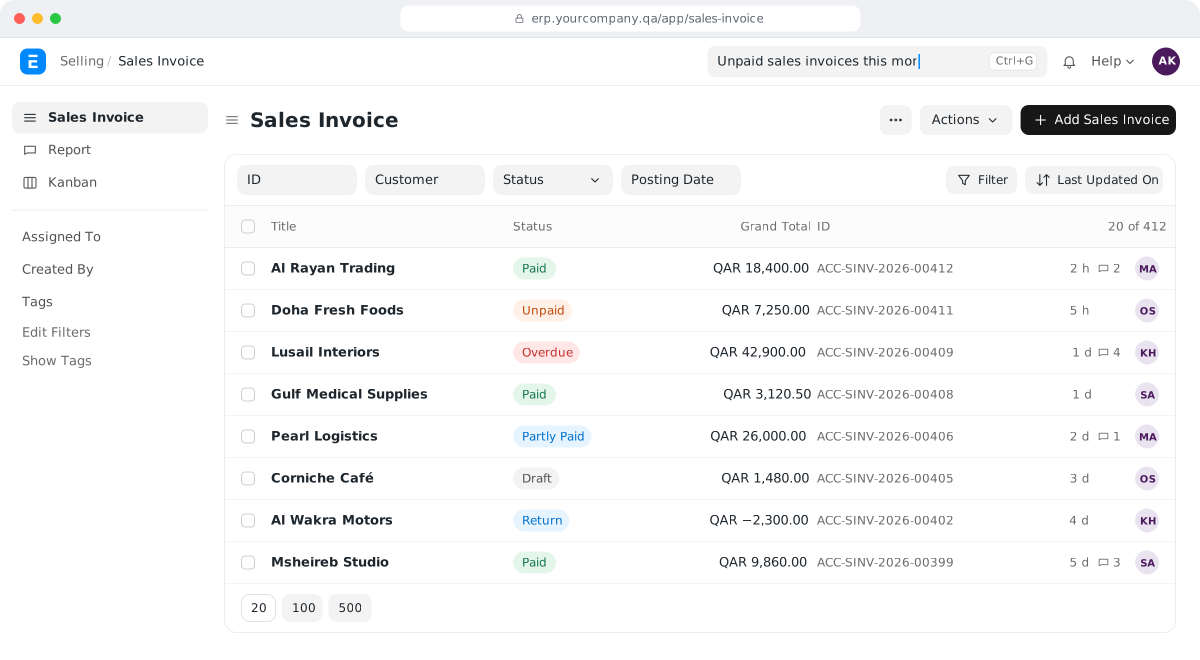
ERPNext CRM and POS software covers leads, quotations, sales orders and deliveries, invoicing and collections, point of sale and a van sales app, all linked to inventory and accounting.
Leads and opportunities
Enquiries from your website, email or phone, assigned to a salesperson with the next follow-up date.
Quotations
Quotations with your price lists, discounts and terms, turned into a sales order without retyping.
Sales orders and delivery
Orders reserve stock, and delivery notes and invoices follow from the same order.
Invoicing and collections
Invoices, payments and customer balances post to accounting, with a credit limit for each customer.
Point of sale
Cashier screens with barcodes, returns and receipts, linked to stock and accounts.
Van sales app
A mobile app we build for salespeople on the road, linked to stock and customer balances.
Why does ERPNext sales and CRM suit companies in Qatar?
Set up by Akwad Programming, ERPNext sales and CRM suits companies in Qatar: Arabic and English quotations and invoices, local payment gateways and WhatsApp messages in one system.
- Quotations and invoices in Arabic and English
- Online payments through QPay (Qatar Central Bank), QNB Payment Gateway and Doha Bank
- Order updates and reminders on WhatsApp
- Multi-company and intercompany sales
- No licence fee for each salesperson you add
How does ERPNext CRM stop us losing enquiries and follow-ups?
ERPNext CRM software turns every enquiry into a lead with an owner and a next follow-up date, so it no longer sits in one salesperson’s phone or inbox. When enquiries arrive by phone, email, WhatsApp and walk-ins, it is easy to forget who called, what they asked for and who promised to call back.
Your team records each lead in one place, with notes and the history of every call and email. When the customer is ready to talk about a deal, the lead becomes an opportunity with the items and expected value, so your sales manager can see the open deals and which ones have gone quiet.
- Each salesperson sees their own leads and today’s follow-ups.
- The manager sees all open opportunities by salesperson, stage and value.
- When a salesperson leaves, their customers and history stay in the system.
How does a quotation become an order and an invoice?
In ERPNext a quotation turns into a sales order, a delivery note and an invoice with a few clicks, carrying the same items, prices and terms, so nothing is typed twice. Today many teams prepare quotations in Word or Excel, then retype them when the customer confirms, and again when finance invoices.
| Step | What happens |
|---|---|
| Quotation | Prepared from your price list with discounts and terms, printed in your format and emailed to the customer |
| Sales order | Created from the accepted quotation; stock is reserved and the warehouse sees what to prepare |
| Delivery note | Records what left the warehouse and updates ERPNext inventory management |
| Sales invoice | Created from the order or delivery; the customer balance and your income update in ERPNext accounting software |
| Payment | Recorded against the invoice; the customer’s statement is up to date |
At each step you can open the documents before and after it, so when a customer asks about an order, anyone on your team can answer.
How does ERPNext control prices, discounts and customer credit limits?
You set price lists and pricing rules once, and ERPNext applies them on every quotation and invoice, so salespeople don’t decide discounts on their own. You can have a retail list, a wholesale list and special prices for key customers, plus discounts by quantity or for a set period.
- Selling below cost: ERPNext can check the selling price against the purchase price or the item’s cost and stop the sale.
- Minimum price and approvals: we can add a minimum selling price and an approval step for any sale below the price list.
- Credit limits: each customer has a credit limit per company. When a new order would take them over it, ERPNext stops it until someone with the right role approves.
How does the ERPNext POS system work in shops and pharmacies?
The ERPNext POS system gives your cashiers a simple screen where they scan barcodes, take payment by cash, card or several methods at once, print a receipt and handle returns. ERPNext keeps track of what each sale takes from stock, and when the shift is closed, the day’s sales post to stock and accounts in one go. We connect receipt printers and cash drawers, and receipts print in Arabic and English.
Each shop or counter has its own POS settings, with its own warehouse, price list and payment methods. The cashier opens a shift with the cash in the drawer and closes it at the end of the day, and the closing entry compares what the system expects with what was counted, so differences show up the same day, not at month end. We set up pharmacy point of sale with batch and expiry control for Basma Medical Center; see how this fits clinics and pharmacies.
Can our team sell in the field and get paid online?
Yes. We build mobile apps for field sales and connect online payments and WhatsApp messages to ERPNext, so orders and payments from outside the office land in the same system. Your salespeople, customers and finance team then work from the same customer balances, whichever way the order or payment arrived.
- Van sales: for distributors that sell from vans, our mobile app development team builds a van sales app linked to ERPNext stock and customer balances; see van sales for trading and distribution companies.
- Online payments: we have integrated QPay (Qatar Central Bank), QNB Payment Gateway and MPGS through Doha Bank, and we can record payments made online in ERPNext; see payment gateway integration.
- WhatsApp: order confirmations, payment reminders and delivery updates through the WhatsApp Business API. Akwad Programming is an official Meta WhatsApp Tech Provider.
These are built and connected for your business rather than switched on in standard ERPNext, and we agree the scope with you before we start.
How do we move our customers and price lists from Excel or Odoo?
We import your customers, contacts, items and price lists from your files, and bring in open customer balances so statements are right on the first day. Your team doesn’t start from an empty system. If your customers are in Odoo today, see Odoo alternative in Qatar: how companies move to ERPNext.
- Customers: names in Arabic and English, contacts, customer groups, credit limits and payment terms.
- Items and prices: item codes, units and each price list you use.
- Open balances: unpaid invoices as of your go-live date, so ageing and follow-up continue without a gap.
- Documents: we design your quotation, invoice and receipt formats in Arabic and English before go-live.
How does Akwad Programming set up ERPNext sales and CRM in Qatar?
Akwad Programming maps your sales process with you from our office in Doha, sets up ERPNext sales and CRM, moves your data, trains your sales team and supports you after go-live. We work in Arabic and English, and we set the system up around how you sell: from the office, a shop or a van. Sales and CRM is one module of the ERP system we set up for companies in Qatar. It suits trading and distribution companies and shops alike, and the full process is on our ERPNext implementation service page.
- Setup: lead and opportunity stages, price lists, discount rules, credit limits and approvals.
- Documents: quotations, invoices and receipts with your logo, in both languages.
- Mobile and integrations: van sales apps, payment gateways and WhatsApp messages when you need them.
- Training: two 2-hour sessions per module, plus a session for managers on reports.
- Hosting: in Microsoft Azure’s data centre in Qatar, so your customer data stays in the country, or on AWS if you prefer. Backups run every day and are kept for 30 days, with a copy in a second location.
- After go-live: a free warranty from delivery, then support through support@akwad.qa. We test every upgrade on a separate test copy first, before it reaches your live system.
ERPNext has no licence fees, so adding a salesperson or cashier doesn’t add a licence cost. What the rest of an ERP budget goes on is explained in our guide how much an ERP system costs in Qatar.
Three steps to go live with ERPNext sales and CRM
- 01
Map your sales process
We document how enquiries arrive, who follows them up, your price lists, discount rules and approvals.
- 02
Set up and move your data
We set up ERPNext sales and CRM, design your quotation and invoice formats, and import your customers, items and prices.
- 03
Train and go live
We train your sales team to enter data the same way, then support you after go-live.
ERPNext sales and CRM projects we’ve delivered in Qatar
- Saba Trading Group
Saba Trading Group: Trading & distribution · ERPNext + mobile app
Approvals for below-price sales, salesperson reports and a van sales app

Basma Medical Center: Healthcare · ERPNext
Pharmacy point of sale with batch and expiry control, returns and split payments
- Ellora Group
Ellora Group: Trading · Multi-company ERPNext
Intercompany sales and pricing, customer sales history and a minimum selling price
- DAO, Joelle and Al-Nawras pharmacies
DAO, Joelle and Al-Nawras pharmacies: Pharmacy retail · ERPNext POS
A point of sale for each pharmacy
ERPNext sales, CRM and POS: common questions
Can we see each customer's last price before quoting in ERPNext?
Yes. The item-wise sales history report shows what each customer bought and at what price, and we can add the customer's last price for each item to the quotation screen itself, so prices stay consistent and nobody quotes from memory.
Can we run a loyalty programme in ERPNext POS?
Yes. ERPNext has loyalty programmes that give customers points on what they buy, and the cashier can redeem the points against a later purchase.
Can ERPNext calculate commission for each salesperson?
Yes. Each salesperson can carry a commission rate, and a commission report shows what each one earned from the sales they made.
Does the ERPNext POS keep working when the internet drops?
Yes. We set up the POS for offline use, so your cashiers keep selling when the connection drops.
Can customers see their ERPNext orders and invoices online?
Yes. ERPNext has a customer portal where customers can log in to view their orders and invoices.
Can we track each salesperson's sales against a target in ERPNext?
Yes. You set targets for each salesperson by period and item group, and a report compares what they sold with their target.
How much does CRM and POS software on ERPNext cost in Qatar?
There are no licence fees for ERPNext. The cost depends on how many shops and POS counters we set up, your price lists and approval rules, your quotation and invoice formats, and whether you need a van sales app, payment gateways or WhatsApp messages. We give you a fixed quote after a short review of your needs.
Ready to run sales from one system?
Tell us how you sell today, from the office, a shop or a van, and we'll show you ERPNext in a demo.