Inventory and warehouse management on ERPNext: know your stock in every warehouse
Akwad Programming sets up ERPNext inventory management software for companies in Qatar, from our office in Doha. Every receipt, transfer, sale and return updates stock as it happens, and warehouses, barcodes, batches and expiry dates live in one system, connected to purchasing, sales and accounts.
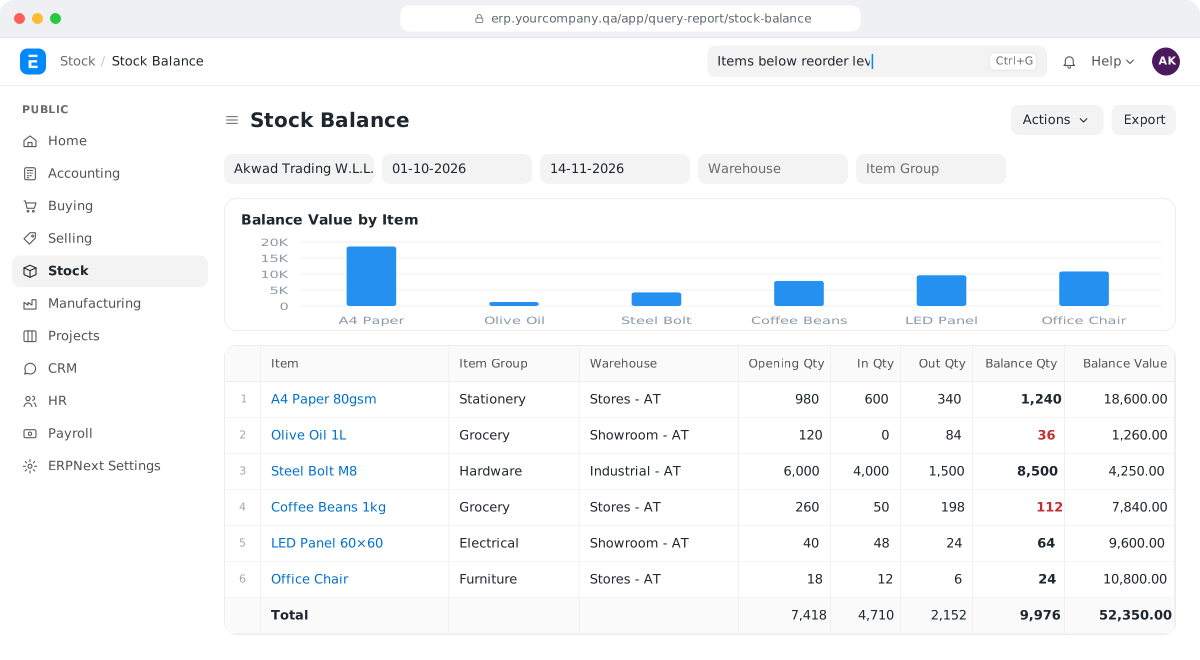
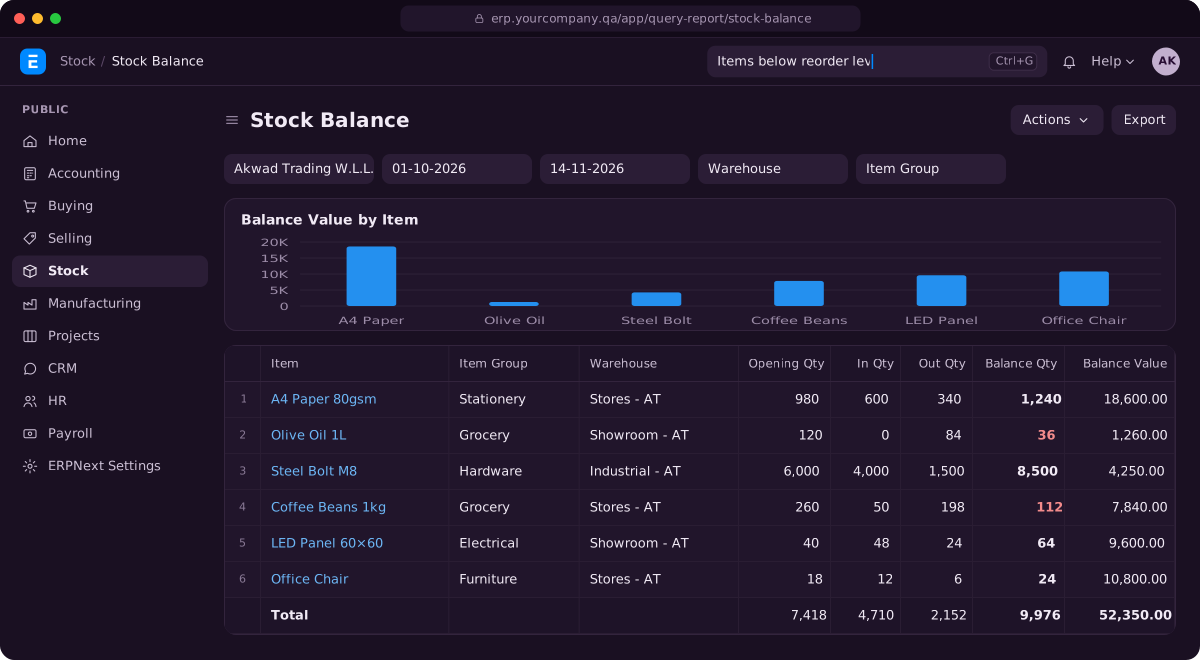
What does inventory and warehouse management software on ERPNext include?
ERPNext inventory software covers stock in every warehouse, barcodes, batches and expiry dates, units of measure, reorder levels, and deliveries and returns, all linked to purchasing, sales and accounting.
Stock in every warehouse
Live quantities by warehouse and branch, with transfers between them and a ledger entry for every move.
Barcodes
Barcodes for each item and each unit of measure, so your team scans instead of typing.
Batches and expiry dates
Batch numbers and expiry dates on every receipt and sale, with a report of what expires soon.
Units of measure
Buy by the carton and sell by the piece. Conversion factors keep every quantity right.
Reorder levels and reports
Reorder levels per warehouse can raise material requests automatically, and stock reports show what moves and what doesn't.
Deliveries and returns
Delivery notes, sales returns and purchase returns update stock and accounts in one step.
Why does ERPNext inventory software suit companies in Qatar?
ERPNext inventory, set up by Akwad Programming, suits companies in Qatar that keep stock in several warehouses, branches or group companies, sell from vans and work in Arabic and English.
- Stock across warehouses, branches and companies
- Stock levels and past prices inside the sales screen
- Stock ageing and slow-moving item reports
- Van sales apps linked to ERPNext stock
- Item names and documents in Arabic and English
Why doesn’t the stock in our system match the shelf, and how does inventory software fix it?
Stock figures drift when movements are recorded late, twice or not at all; in ERPNext inventory management software, every receipt, transfer, sale and return is a document that updates stock the moment it is approved. When the warehouse keeps its own sheet, sales use another and accounts a third, nobody knows which number is right, and the answer usually comes from a physical count.
In ERPNext, each movement writes a line to the stock ledger with the date, the warehouse, the quantity and who recorded it. When a number looks wrong, you open the ledger and see exactly which document changed it.
- By default, ERPNext won’t let anyone deliver or issue stock that the system says isn’t there.
- The value of each movement posts to your ERPNext accounting software at the same time, so the stock in your balance sheet follows the stock on your shelves.
- Stock is valued by FIFO or moving average, so the cost of what you sell is calculated for you.
How does ERPNext inventory software show stock across warehouses and branches?
You see live stock for every warehouse in one report, and you can group warehouses by branch or company to see the total. Your team no longer calls the other branch to ask whether an item is available, and buyers and sales see the same figures at the same moment.
Transfers between warehouses are recorded as one document that takes stock out of one place and puts it into another, so goods in transit are never counted twice. For each item, ERPNext also shows what is ordered from suppliers, what is reserved for customers and what will be left after both, which helps your buyers and sales team make the same decision from the same numbers. Online stores work the same way: for Widam Food, online orders are checked against branch stock before they are confirmed.
How does ERPNext handle batches and expiry dates?
ERPNext records a batch number and expiry date on every receipt and sale for the items that need them, so you always know which batch went to which customer. This matters for food, pharmacy, cosmetics and any goods with a shelf life, which is why we set it up for clinics and pharmacies as well as distributors.
- Receiving: the warehouse team enters the batch and expiry date when goods arrive, or scans them.
- Selling: your team picks the batch on the delivery or invoice. Depending on your version and settings, ERPNext can suggest the batch that expires first.
- Watching expiry: a batch expiry report shows what expires soon, so you can sell or clear it before it becomes a write-off.
- Recalls: if a supplier recalls a batch, you can see which customers received it.
How does ERPNext handle units of measure and barcodes, from carton to piece?
Yes. Each item has a stock unit and as many other units as you need, each with its own conversion factor. You buy by the carton, store by the piece and sell by the pack, and ERPNext converts every quantity for you.
Each unit can also carry its own barcode. Scanning the carton barcode at receipt adds one carton, which ERPNext counts as the right number of pieces; scanning the piece barcode at the counter sells one piece. Your team scans instead of typing item codes, which removes most counting mistakes. For shops and counters, ERPNext CRM and POS software uses the same barcodes.
How do we know when to reorder?
You set a reorder level and reorder quantity for each item, per warehouse if needed, and, once automatic reordering is switched on, ERPNext raises a material request when stock reaches that level. Your buyer starts the day with a list of what needs buying, instead of hearing from sales that an item has run out.
Material requests can be for purchase, handled in ERPNext procurement software, for a transfer from another warehouse that has stock, or for production in ERPNext production planning, which is how factories and workshops in Qatar keep raw materials on hand. Reports such as stock ageing show what hasn’t moved for months, so you stop reordering slow items and free up cash and shelf space.
How do we run a stock count in ERPNext and enter opening stock?
You enter counted quantities in a stock reconciliation, and ERPNext adjusts stock and posts the difference to your accounts. The same tool is used on go-live day to enter your opening stock with its value. Every adjustment keeps its date and who made it, so your auditor can see why a quantity changed. How to plan and run the count itself, from freezing movements to recounting differences, is in our guide how to run a stock count your books agree with.
For your move from Excel, Odoo or another system (for Odoo, see Odoo alternative in Qatar: how companies move to ERPNext):
- Items: codes, names in Arabic and English, item groups, units and barcodes are imported from your files.
- Warehouses: set up to match your warehouses, branches and companies.
- Opening stock: quantities and values by warehouse, with batches and expiry dates where you track them.
- Count and check: we reconcile the opening figures with your count and your accounts before you start trading in ERPNext.
How does Akwad Programming set up ERPNext inventory management in Qatar?
Akwad Programming maps your warehouses and items with you from our office in Doha, sets up ERPNext inventory management, moves your data, trains your warehouse, purchasing and sales teams and supports you after go-live. We work in Arabic and English, and we set the system up around how your goods move, not the other way round. Inventory is one module of the ERP system we set up for companies in Qatar. It suits trading and distribution companies that hold stock in several warehouses, and the full process is on our ERPNext implementation service page.
- Setup: warehouses, item groups, units, barcodes, batches and approvals for stock movements, so stock management follows how your goods really move.
- Mobile: when your salespeople sell from vans, our mobile app development team can build a van sales app linked to ERPNext stock.
- Training: two 2-hour sessions per module, plus a session for managers on reports.
- Hosting: in Microsoft Azure’s data centre in Qatar, so your data stays in the country, or on AWS if you prefer. Backups run every day and are kept for 30 days, with a copy in a second location.
- After go-live: a free warranty from delivery, then support through support@akwad.qa. We test every upgrade on a separate test copy first, before it reaches your live system.
ERPNext has no licence fees, so adding warehouse or branch staff doesn’t add a licence cost. What the rest of an ERP budget goes on is explained in our guide how much an ERP system costs in Qatar.
Three steps to go live with ERPNext inventory
- 01
Map your warehouses
We document your warehouses, item groups, units, barcodes and who approves stock movements.
- 02
Set up and move your data
We set up ERPNext stock, import your items and opening stock from Excel or your old system, and reconcile the counts with you.
- 03
Train and go live
We train your warehouse, purchasing and sales teams, then support you after go-live.
ERPNext inventory projects we’ve delivered in Qatar
- Saba Trading Group
Saba Trading Group: Trading & distribution · ERPNext + mobile app
Batches, expiry dates, barcodes by unit and a van sales app
- Ellora Group
Ellora Group: Trading · Multi-company ERPNext
Intercompany stock transfers and stock across all warehouses in one view

Widam Food: Retail & delivery · Frappe platform
Related guides
- How to Run a Stock Count Your Books Agree With
How to Run a Stock Count Your Books Agree With: Guide · Stock count
Plan, freeze movements, count blind, recount differences and post one adjustment
ERPNext inventory and warehouses: common questions
Can we use handheld barcode scanners in an ERPNext warehouse?
Yes. ERPNext works with standard barcode scanners and with phone cameras, so your team scans items on receipts, transfers, deliveries and stock counts instead of typing codes.
Can ERPNext stop us selling expired items?
Yes. When an item is tracked by batch, ERPNext won't let a batch past its expiry date go out on a delivery or invoice, so expired stock can't reach a customer by mistake.
Can ERPNext show the value of our stock on a past date?
Yes. The stock balance and stock ledger reports can be run for any date, so finance can see the quantity and value of each item, in each warehouse, at the end of last month or last year.
Can we print barcode labels from ERPNext?
Yes. We design label print formats with the item name, price and barcode, so your warehouse can label goods as they arrive.
Can ERPNext check the quality of goods we receive?
Yes. You can require a quality inspection on receipts for the items that need it, and ERPNext can stop or warn when the inspection is missing or rejected.
Can we track items by serial number in ERPNext?
Yes. Items such as electronics or equipment can carry a serial number, so you can follow each unit from receipt to the customer who bought it.
How much does inventory management software on ERPNext cost in Qatar?
There are no licence fees for ERPNext. The cost depends on the number of warehouses and items we set up, your barcode label formats, whether you track batches or serial numbers, and whether you need a van sales app. We give you a fixed quote after a short review of your needs.
Ready to see your real stock?
Tell us how many warehouses and items you manage, and we'll show you ERPNext in a demo.