Project management software on ERPNext, with the real cost of each project in view
Akwad Programming sets up project management software on ERPNext for project-based companies in Qatar, such as consultancies, maintenance and events teams and contractors, from our office in Doha. Projects, tasks, timesheets and costs live in one system, and purchases, payroll and expenses carry the project, so profit by project is ready when you need it.
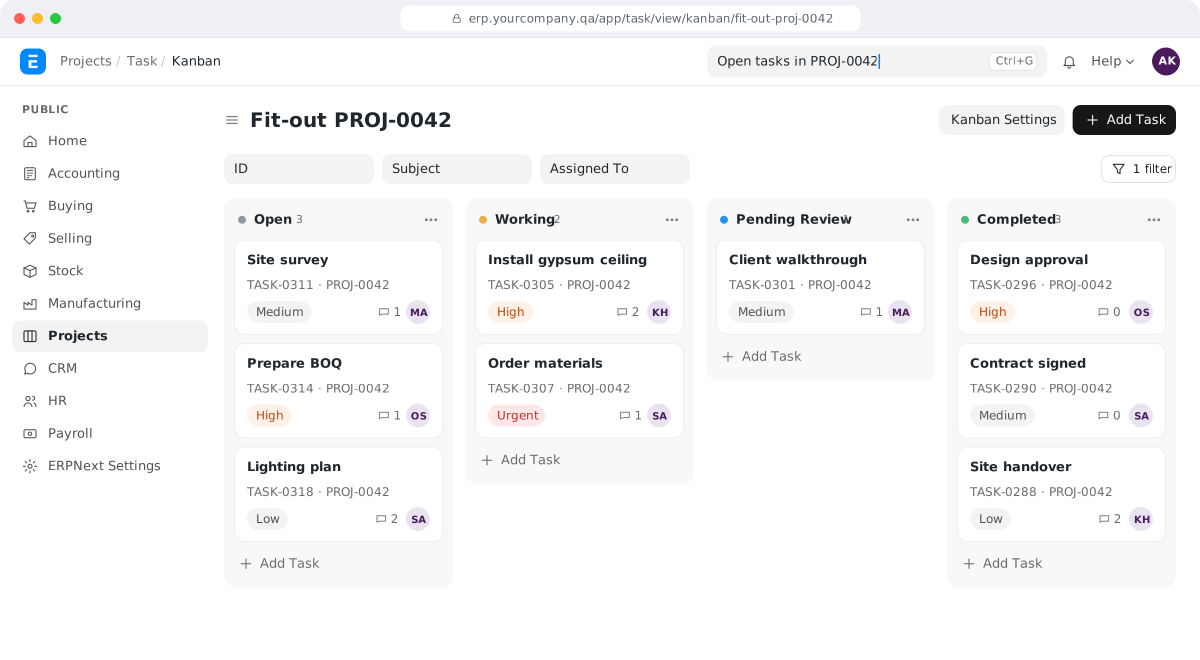
What does project management software on ERPNext include?
ERPNext project management software covers projects and tasks, timesheets, project costing, billing, project payroll and approvals, all linked to accounting, purchasing and payroll.
Projects and tasks
Projects broken into tasks with owners, dates, dependencies and progress, on a list or a Gantt chart.
Timesheets
Hours logged against projects and tasks, with an hourly cost for each employee or activity.
Project costing
Purchases, stock, expenses and payroll recorded against the project, with profitability by project and cost centre.
Billing
Invoices from approved billable hours or by milestone, with what is billed and what is still to bill.
Project payroll
Salaries allocated to the projects your staff work on, including transfers between projects.
Approvals and sign-offs
Approval workflows with signatures on printed documents, and completion certificates where your clients need them.
Why does ERPNext project management suit companies in Qatar?
Set up by Akwad Programming, ERPNext project management suits project-based companies in Qatar because hours, purchases and salaries reach each project, and staff log their time from a phone.
- Profit by project, salaries included
- Customer invoices from billable timesheets
- Gantt charts and task dependencies
- Project templates for repeat work
- A client portal for project progress
- Expense claims and materials charged to each project
How does project costing in ERPNext track budget, timesheets, billing and margin?
ERPNext project management software shows each project’s cost, billing and margin at any time. Purchases, materials and timesheets are recorded against the project as they happen, and salaries and expenses go to its cost centre. You no longer wait for finance to pull figures from several files at the end of the job, when it is too late to fix an overrun.
Each project page shows the numbers management asks for:
| Figure | Where it comes from |
|---|---|
| Estimated cost | Entered when the project is opened |
| Labour cost | Timesheets, at each employee’s or activity’s cost rate |
| Purchases and materials | Purchase invoices from ERPNext procurement software and stock issued to the project |
| Billed amount | Sales invoices raised against the project |
| Gross margin | Billed amount less labour, purchases and materials |
Each project can also have its own cost centre and budget in ERPNext accounting software. The profit and loss report for that cost centre gives the full picture, salaries included, and a purchase that would push the project over budget is flagged before it is approved.
How do we bill clients from timesheets and milestones?
ERPNext bills clients in two ways: from approved billable hours on timesheets, or by milestone, with payment terms that split the contract into stages such as an advance, progress stages and a final payment. Either way, the invoice comes from data already in the system, so nobody converts a separate sheet into an invoice at month end.
- Timesheets: employees log hours against a project and task. ERPNext values each hour at a cost rate for the project’s costing and, where the work is billable, at a billing rate for the customer invoice. Rates can be set for each type of activity and, where needed, for each employee.
- From hours to invoice: when billable hours are approved, you create the sales invoice from the timesheet, and the timesheet shows what has been billed and what is still to bill.
- Milestones: a sales order carries the agreed stages, and each invoice is raised against its stage, so you always know which part of the contract is still to bill. Contractors who hold retention on progress invoices can see how we add it on our page on ERP for contracting companies in Qatar.
This suits consultancies, maintenance teams, events and any company that charges clients by the hour, the day or the stage.
How does project payroll work in ERPNext?
We set up ERPNext HR and payroll so each employee’s salary is charged to the projects they work on, and staff who move to another project are moved in the system from that date. In project-based companies, labour is often the biggest cost, and without it the project report only shows half the picture.
- Each employee’s salary cost can be split by percentage across cost centres, such as one cost centre per project.
- Payroll can be run for the staff of a specific project, with the WPS salary file produced in the same run.
- When an employee transfers to another project, the transfer is recorded, so cost follows them from that date.
How do we plan tasks, approvals and sign-offs on each project?
Tasks within a project have owners, dates and dependencies, and you can view them on a Gantt chart to see what is late and what it holds up. For repeat work, a project template creates the usual tasks for you each time you open a new project, so every project starts with the same checklist instead of a blank page.
Approvals follow the steps you define, and each approval is recorded with the approver’s name and time. We design your printed documents so approvers’ signatures and your stamp appear on them, including a completion certificate when your client asks for one before final payment.
How do we move our open projects into ERPNext?
We bring in your open projects with their budgets, costs to date and billing to date, so reports in ERPNext continue from where your spreadsheets stop. You don’t need to wait for current projects to finish before you start, whether the figures sit in Excel, Odoo or another system; for Odoo, see Odoo alternative in Qatar: how companies move to ERPNext.
- Projects: name, customer, contract value, start and end dates and cost centre.
- Costs and billing to date: brought in as opening figures so margins are right from day one.
- Employees: their current project, so payroll is charged correctly from the first month.
How does Akwad Programming set up ERPNext project management in Qatar?
Akwad Programming starts by documenting with you, from our office in Doha, how you open projects, assign staff, pay them and bill clients. Then we set up ERPNext project management, move your data, train your teams and check the first project reports with your finance team. We work in Arabic and English. Projects is one module of the ERP system we set up for companies in Qatar, and we have set up project-based payroll, project profitability and completion certificates for Asklan for Trading and Agriculture Company; read the Asklan project story. The full process is on our ERPNext implementation service page.
- Setup: projects, cost centres, budgets, timesheets, approvals and project reports.
- Payroll and HR: project-based payroll and WPS files in the same system.
- Training: two 2-hour sessions per module, plus a session for managers on reports.
- Hosting: in Microsoft Azure’s data centre in Qatar, so your data stays in the country, or on AWS if you prefer. Backups run every day and are kept for 30 days, with a copy in a second location.
- After go-live: a free warranty from delivery, then support through support@akwad.qa. We test every upgrade on a separate test copy first, before it reaches your live system.
ERPNext has no licence fees, so adding project managers and site staff doesn’t add a licence cost. What the rest of an ERP budget goes on is explained in our guide how much an ERP system costs in Qatar.
Three steps to go live with ERPNext project management
- 01
Map your projects
We document how you open projects, assign staff, pay them and bill clients, and the reports management needs.
- 02
Set up and move your data
We set up projects, cost centres and approvals, and import your open projects, employees and balances.
- 03
Check the numbers with you
We review project cost reports with your finance team, then support you after go-live.
Clients who run their projects in ERPNext in Qatar

Asklan for Trading and Agriculture Company: Trading & agriculture · ERPNext
Project profitability, project-based payroll and completion certificates

Qatar Athletics Federation: Sports · ERPNext + mobile app
ERPNext project management: common questions
Can staff log their hours from a phone in ERPNext?
Yes. Timesheets can be filled in from a phone's browser, so engineers, consultants or site supervisors record their hours at the end of the day instead of on paper.
Can employees charge their expenses to a project in ERPNext?
Yes. An expense claim can carry the project, with a photo of the receipt sent from the Frappe HR mobile app. Once the claim is approved, the amount is added to that project's cost.
Can we log client issues against a project in ERPNext?
Yes. Issues raised by the client or your own team can be logged against the project, assigned to someone and followed until they are closed, so requests don't get lost in email.
Can clients see their project's progress?
Yes. A customer can be given access to the ERPNext portal to see their project and its tasks, without seeing your costs or other projects.
Can ERPNext collect progress updates from the project team?
Yes. ERPNext can email the project's users at set times asking what they did, and keeps their replies with the project.
Can we see which materials went to each project?
Yes. Stock issued to a project is tracked against it, and a project stock report shows which materials each project received and what they cost.
How much does project management software on ERPNext cost in Qatar?
There are no licence fees for ERPNext. The cost depends on how many open projects and cost centres we bring in, how you bill your clients, whether salaries are charged by project, and the approval steps and printed documents you need. We give you a fixed quote after a short review of your needs.
Ready to see what each project really costs?
Tell us how many projects you run at a time and how you bill your clients, and we'll show you ERPNext in a demo.