ERP system for trading and distribution companies in Qatar
Akwad Programming builds and supports ERP systems for trading and distribution companies in Qatar on ERPNext. Run every company, warehouse and sales van in one system, with price controls, post-dated cheques and stock figures you can trust.
What slows trading companies in Qatar down?
Trading companies in Qatar slow down when stock is checked by phone, sales below cost show up only at month end and van orders are entered after the trip.
- Stock checked by phone, one warehouse at a time
- Sales below cost found only at month end
- Van orders and collections entered after the trip
- Cheques followed in a notebook or spreadsheet
What does an ERP system for trading companies include?
Built on ERPNext, so sales, stock and accounts update together.
Multi-company
Several companies in one system, with intercompany stock, sales and pricing and a company switcher for your team.
Stock in every warehouse
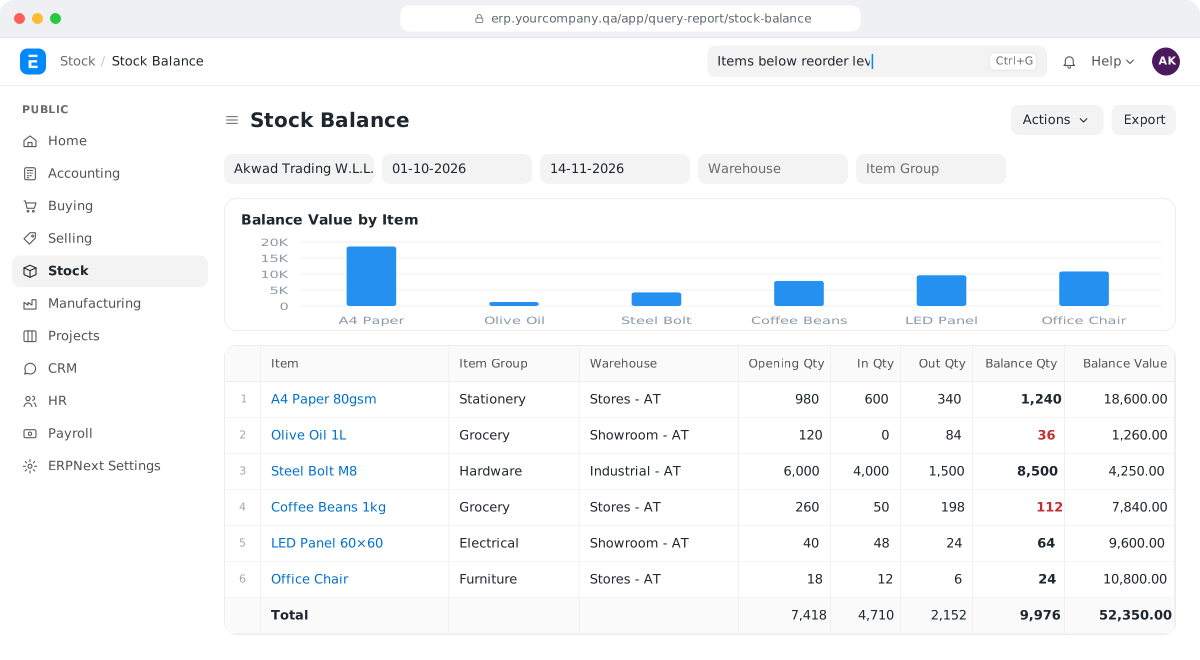
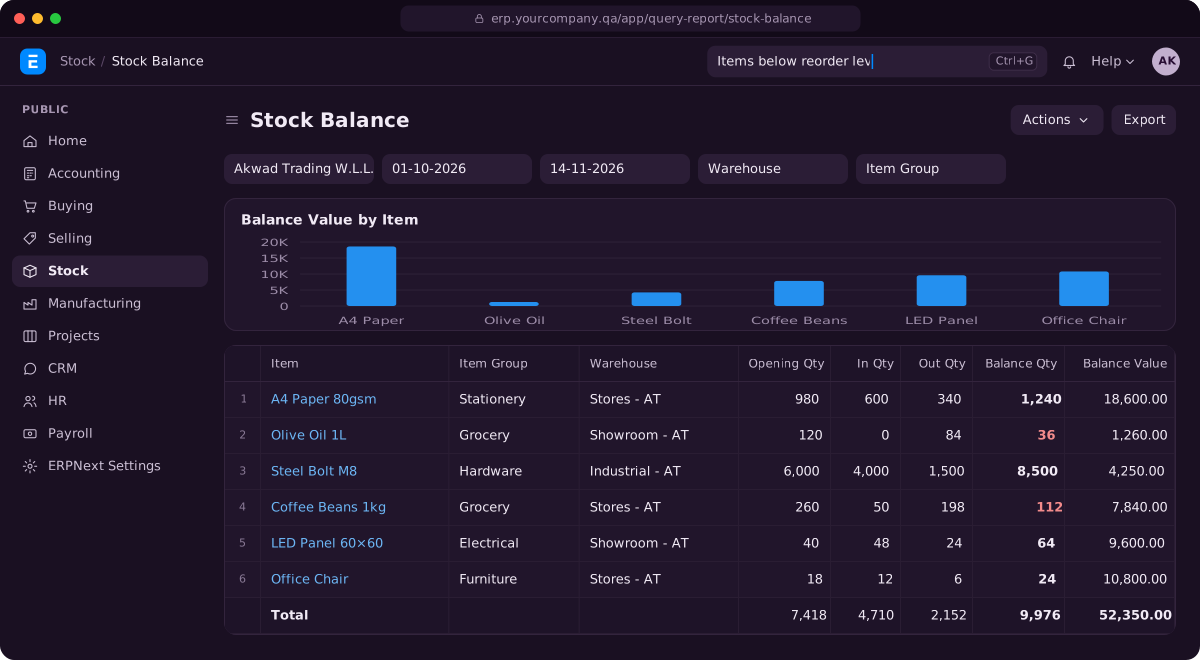
Live stock by warehouse and branch, with batches, expiry dates, units of measure and barcodes for each unit.
Van sales app
A mobile app for routes, visits, orders, collections and returns, linked to ERPNext stock.
Price controls
A minimum selling price, past customer prices in the sales screen and approvals for sales below cost or the price list.
Post-dated cheques
Enter cheques one by one or in bulk, follow each until it clears and handle bounced cheques.
Purchasing and landed costs
Orders and invoices in the supplier's currency, with freight and customs added to the item cost.
Why do trading and distribution companies in Qatar choose Akwad?
Akwad Programming runs every company, warehouse and sales van of a trading business in Qatar in one ERPNext system, with price approvals, post-dated cheques and no per-user licence fee.
- Stock across warehouses, branches and companies
- Approvals for sales below cost or below the price list
- Post-dated cheques and bulk cheque entry
- Documents and reports in Arabic and English
- No licence fee for each user you add
How does a distributor see stock across companies, warehouses and vans?
ERPNext inventory shows live stock by company, warehouse, branch and van, so your sales team checks the quantity on screen before promising a customer anything. Nobody has to call the storekeeper to ask what is left.
In many trading companies, each warehouse keeps its own count, and the figures only meet at month end. Goods come in by the carton and go out by the piece, so the numbers rarely agree.
We set ERPNext up for the way you actually hold stock:
- units for each item, such as carton, pack and piece, with a barcode for each unit
- batch numbers and expiry dates, so you know when each batch runs out
- pallets and gross weight where you need them
- the customer’s past sales and the stock on hand, inside the sales screen
For a trading group with several companies, the sales screen shows stock and the customer’s sales history while the order is being entered, and managers can see stock across the group’s warehouses and racks.
How do van sales and collections reach the accounts?
Van sales and collections reach the accounts through a van sales app connected to ERPNext sales and stock. The salesperson records orders, payments, returns and credit notes in the app during the visit, and they reach ERPNext from the app instead of being typed in after the trip.
Today, many salespeople come back with a book of handwritten invoices and a bag of cash and cheques. The office spends the next morning entering them, and nobody knows the real stock in the van or the customer’s balance until that is done.
| On the route | In ERPNext |
|---|---|
| The salesperson starts a trip on a set route | The trip and route are recorded |
| Visits a customer and takes an order | A sales order from the van’s stock |
| Collects cash or a cheque | A payment against the customer’s balance |
| Takes back damaged or expired goods | A return and a credit note |
The app is built by our mobile apps team on the same ERPNext data as the office, so the van’s stock and the customer’s balance are always current.
How do we stop salespeople selling below cost?
Set a minimum selling price for each item, and send any sale below cost or below the price list for approval before it goes through. You find out at the moment of sale, not at month end.
The salesperson also sees what this customer paid last time, right in the sales screen, so prices stay consistent and a discount becomes a decision, not a habit. We set up approvals for sales below cost or below the price list for a distributor, and a minimum selling price with past customer prices for a trading group. Credit limits and discounts work the same way; see the price and credit controls in ERPNext sales and CRM.
How do we follow post-dated cheques until they clear?
Record each cheque in ERPNext accounting when you receive it, one by one or in bulk, and the system follows it through deposit to clearance or return. You see every cheque in hand, its due date and its status in one list, instead of a notebook.
In Qatar, post-dated cheques are part of everyday trade, and a big customer may hand over several months of cheques at once. Bulk entry lets your accountant record them in one go. When a cheque bounces, it is handled in the same place and the customer’s balance updates.
For a trading group with several companies, we set up post-dated cheque clearance and bounced cheques, together with the cash book and customer and supplier balances. For a trading and agriculture company, we added bulk entry of post-dated cheques. Our guide to ERPNext journal entry types explains the entries behind cheques and payments.
Can one system run all our group companies?
Yes. Each company keeps its own accounts in one ERPNext system, and your team switches between companies without logging in again. Stock, sales and prices between group companies are recorded once, and management sees reports for the whole group.
For one client, we set up a group of separate trading companies in one system, with switching between companies and branches. See also ERPNext inventory and warehouse management for how stock moves between group warehouses.
How do imported goods get their true cost?
Raise purchase orders and invoices in the supplier’s currency in ERPNext procurement software, then add freight, customs and clearing charges to the cost of the items they belong to. Your margin reports then show the real profit on each item, not just the price on the supplier’s invoice.
This matters most when you compare suppliers. With those costs included, a supplier gross profit report, like the one we built for a trading and distribution company, shows which suppliers’ goods actually make you money.
What can managers see at the end of the day?
Managers see reports built from the same data the team enters during the day, so nobody has to put them together in a spreadsheet. Because sales, stock, cheques and accounts sit in one system, the figures agree with each other.
Reports we typically set up for trading companies include:
- sales by salesperson, route and customer
- stock by warehouse, with items close to expiry
- gross profit by item and by supplier
- customer balances, with the cheques you hold and their due dates
- a trading profit and loss for each company and for the whole group
For one distributor we built purchasing, stock, supplier gross profit and salesperson reports. For a trading group with several companies, we set up customer and supplier balances, account statements and a trading profit and loss report. Managers open them when they need them, instead of waiting for month end. For a wider view of the business, see how to read the ERPNext Financial Ratios report, or read about our ERPNext implementation service. For what an ERP budget covers, see ERP cost in Qatar: what you actually pay for, and see how the whole ERP system in Qatar fits together.
How we work with trading companies
- 01
Map your operation
We document your companies, warehouses, units, price lists, routes and who approves what.
- 02
Set up and move your data
We set up ERPNext, import your items, customers and opening stock, and build the van sales app around your routes.
- 03
Train and go live
We train your office, store and van teams, then support you after go-live.
Our projects for trading companies in Qatar
- Saba Trading Group
Saba Trading Group: Trading & distribution · ERPNext + mobile
Van sales app, batches and expiry dates, and approvals for below-price sales
- Ellora Group
Ellora Group: Trading · Multi-company ERPNext
Several companies in one system, with intercompany sales, a minimum selling price and post-dated cheque clearance

Asklan for Trading and Agriculture Company: Trading & agriculture · ERPNext
Post-dated cheques with bulk entry, and purchase approvals with signatures on printed documents
ERPNext modules for trading companies
- Sales, price lists and customers
Sales, price lists and customers: Sales & CRM · ERPNext
Quotations, orders, price lists and customer history in one ERPNext system
- Stock in every warehouse
Stock in every warehouse: Inventory · ERPNext
Stock by warehouse, branch and van, with batches, expiry dates and barcodes
- Imports and landed costs
Imports and landed costs: Procurement · ERPNext
Purchase orders in the supplier's currency, with freight and customs in the item cost
Systems for trading and distribution companies in Qatar: common questions
How much does an ERP system for a trading company cost in Qatar?
There are no licence fees for ERPNext. The cost depends on the number of companies and warehouses, the items and opening stock we import, the approval and price rules, a van sales app if you need one, and hosting. We give you a fixed quote after a short review of your needs.
Do you build van sales apps for distributors in Qatar?
Yes. We build van sales apps linked to ERPNext stock, orders and payments. For a trading and distribution company, we designed the app's data and its link to ERPNext, covering trips, routes, visits, stock, orders, payments, returns and credit notes.
Can our system connect to the Ministry of Commerce and Industry?
Yes. Akwad Programming has built connectors to Ministry of Commerce and Industry platforms for trading clients in Qatar, and set up excise (selective) tax handling for a distributor. We check the ministry's current requirements with you before we set a connector up.
Can we stop orders from customers who are over their credit limit?
Yes. ERPNext holds a credit limit for each customer and stops a new order or invoice that would take them over it, unless someone with the right role approves it.
Can each group company have its own document numbers and print formats?
Yes. For a group of trading companies, we set up document numbering for each company and printing on A4 or A5 forms to each user's own printer, with staff switching between companies without logging in again.
Do you work with food and FMCG distributors in Qatar?
Yes. For a trading and distribution company, we set up batches and expiry dates, units, barcodes, pallets and gross weight, so the team knows which stock runs out first.
Can you bring in our items, customers and opening stock?
Yes. We import your items with their units and barcodes, your customers and suppliers with their balances, and your opening stock in each warehouse, so the system starts from your real figures.
Running several companies or warehouses on spreadsheets?
Tell us how many companies, warehouses and vans you run, and we'll show you a demo in ERPNext.