Construction and contracting ERP in Qatar for project costs, retention and payroll
Akwad Programming builds and supports contracting ERP for companies in Qatar on ERPNext. See what each project really costs while it runs, follow retention on every invoice, charge salaries to the right site and get approvals signed on the documents that leave the office.
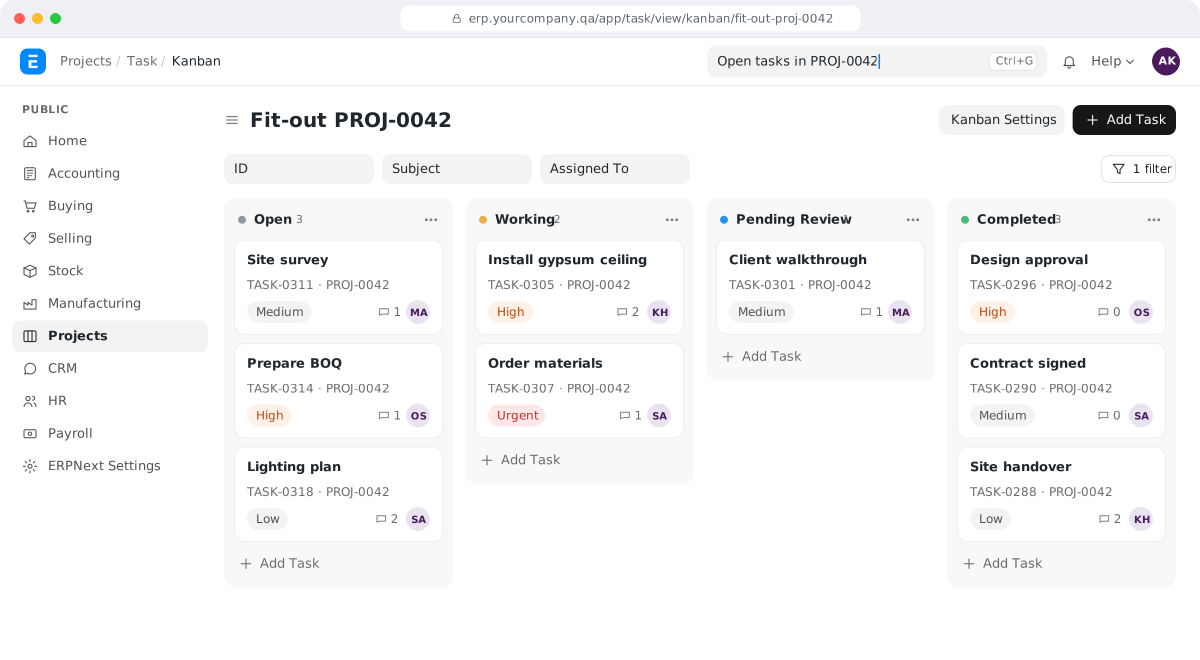
What slows contracting companies in Qatar down?
Contracting companies in Qatar slow down when labour cost per project is worked out by hand, retention sits in a side sheet and payroll doesn't follow staff between sites.
- Labour cost per project worked out by hand
- Retention followed in a side sheet
- Approvals given by phone, signatures added later
- Staff move between sites, payroll doesn't follow them
What does a contracting ERP on ERPNext include?
Built on ERPNext, so purchases, stock, payroll and invoices all carry the project.
Project costing
Purchases, materials, expenses and salaries recorded against each project, with profit by project and cost centre.
Retention
Retention held by your clients and from your subcontractors, each in its own account and shown on statements.
Project payroll
Salaries charged to the projects each employee worked on, including transfers between sites in the middle of the month.
Approvals with signatures
Purchase orders and staff requests approved step by step, with signatures and stamps printed on the documents.
Site attendance and overtime
Check-ins from sites imported into the system, with separate overtime rules for normal days and holidays.
Cheques and guarantees
Post-dated cheques entered in bulk and followed until they clear, and tender and performance guarantees tracked to their end date.
Why do contracting companies in Qatar choose Akwad?
Akwad Programming sets up contracting ERP in Qatar on ERPNext, with retention, project payroll across sites, signed approvals, post-dated cheques and WPS salary files from the same payroll.
- Retention receivable and payable
- Labour cost charged to each project, even after transfers
- Signatures and stamps on completion certificates
- Post-dated cheques with bulk entry
- WPS salary files from the same payroll
- Gratuity and final settlements worked out by the system
How do contractors in Qatar see project profit with retention and site payroll included?
Record every purchase, material issue, expense and salary against the project as it happens, and the profitability report is ready whenever you open it. You no longer wait for the accountant to collect figures from several files at the end of the job, when it is too late to fix an overrun.
In many contracting companies, the site keeps one sheet, purchasing another and finance a third. Each is right on its own, and none of them shows the whole project.
In ERPNext, each project can have its own cost centre. Purchase invoices, stock issued to the site, expense claims and payroll carry that project, so the project shows what it has cost and what has been billed so far. For a company we work with that runs office, farm and project-site teams, we set up project and cost-centre profitability reports, so management reads profit by project without asking finance to build a report.
How do we charge salaries to the right project when staff move between sites?
Record each transfer in the system, and let payroll split the salary between the projects the employee worked on. Labour is often the largest cost on a contracting job, and without this the project report shows only half the picture.
For the same company, we added team transfers and project percentages:
- each employee’s time is split across the projects they worked on in the month;
- payroll journal entries charge the salary cost to each project’s cost centre;
- office, farm and project staff each have their own salary structure;
- the WPS salary file comes out of the same payroll run.
So when a worker moves from one site to another in the middle of the month, HR records the move once, and at month end the salary cost is shared between the two projects. Once this had proved itself in daily use, we packaged it as a separate Frappe app that can be reused.
How do we keep track of retention on progress invoices?
Hold the retained amount in its own account in ERPNext accounting, so it shows on statements and in the ledger instead of in a side sheet. Retention isn’t a standard ERPNext feature, so we add it.
Each progress invoice is raised against the project, and the retention on it goes to retention receivable. When you hold retention from a subcontractor, it goes to retention payable. Your finance team can then answer two questions at any time: how much your clients are holding from you, and how much you are holding from others. When the project reaches the agreed stage, the retention is released from the same account. If your accountant wants to see the entries behind this, our guide to ERPNext journal entry types explains each one.
How do approvals and completion certificates get signed?
Approve in the system, and let the signature print on the document. Each approval is recorded with the approver’s name and time, and their signature and your stamp appear on the printed copy, so nobody chases a manager to sign paper.
At that company, a staff request such as overtime goes through the supervisor, the project manager, HR, finance and the general manager, and each step is signed on the printed form. Signatures and stamps also appear on:
- purchase orders and material requests;
- statements and final settlements;
- project completion certificates, which clients ask for before the final payment;
- PDF files uploaded to the system.
Managers see what is waiting for them on an approvals dashboard, and workflow emails go out from the system with their attachments.
How do site attendance and overtime reach payroll?
Import check-ins from each site into the system, and let it mark attendance and work out overtime before payroll runs. HR no longer collects attendance sheets from every site and adds them up by hand.
For the same company, check-ins come in from the farms and project sites. The system marks attendance by shift, calculates overtime and lateness deductions, and uses different rules on holidays and normal days. The results go straight onto the salary slip. Complaints that lead to a penalty can be deducted through payroll too, within a monthly limit set in the system. Payroll then produces the WPS salary file for your bank; our guide to WPS in Qatar explains how that file works.
How do we follow cheques and bank guarantees?
Enter post-dated cheques in the system, in bulk when a client hands over several at once, and follow each one until it clears. Your accountant stops keeping a cheque notebook next to the ledger.
Tender and performance guarantees are tracked too. ERPNext has a bank guarantee record with the amount, the bank, the beneficiary and the end date, and it can be linked to the project or the order it covers, so you can see which guarantees are close to expiry before a renewal or release is due. We have set up guarantee tracking and bulk cheque entry for a company with project teams, and trained its accounts team on bulk cheque entry.
What happens when an employee leaves or a document expires?
The system works out end-of-service gratuity and leave encashment (pay for unused leave), and HR prints a full and final statement ready to sign. Settlements stop being worked out on a calculator.
Before that day comes, the employee record holds visa, ID card and health card expiry dates, and reminders warn HR before a contract expires or a probation period ends.
Read the full story of how we built this for a company with project teams, see how project management software on ERPNext, procurement software, fixed asset management and HR and payroll work, or read about our ERPNext implementation service. See how the whole ERP system in Qatar fits together, and for what an ERP budget covers, read ERP cost in Qatar: what you actually pay for.
How we work with contracting companies
- 01
Map your projects
We follow how you open a project, buy for it, move staff between sites, bill the client and approve payments.
- 02
Set up and move your data
We set up projects, cost centres, payroll and approvals, and bring in your open projects, employees and balances.
- 03
Refine in daily use
We train your teams, then keep improving the system as real cases come up, and support you after go-live, starting with a free warranty.
Our projects for project-based companies in Qatar

Asklan for Trading and Agriculture Company: Trading & agriculture · ERPNext
- Techno Clad Trading & Contracting
Techno Clad Trading & Contracting: Trading & contracting · ERPNext
Branded quotations, invoices and purchase orders with payment schedules and stamps
ERPNext modules for contracting companies
- Projects and project costing
Projects and project costing: Projects · ERPNext
Tasks, timesheets and costs in one place, so profit by project is ready when you need it
- Site staff and payroll
Site staff and payroll: HR & Payroll · ERPNext
Attendance, overtime, end of service and WPS files in one ERPNext system
- Equipment and tools
Equipment and tools: Assets · ERPNext
Equipment recorded as assets, with depreciation and a record of who holds each item
Systems for contracting companies in Qatar: common questions
How much does a construction ERP cost in Qatar?
There are no licence fees for ERPNext. The cost depends on the number of projects and companies, your payroll and site-transfer rules, retention and signed approval steps, the open projects and balances we bring in, and hosting. We give you a fixed quote after a short review of your needs.
Can we bring in open projects with their retention balances?
Yes. We bring in your open projects with their costs and billing to date and the retention balances on the go-live date, so reports continue from where your spreadsheets stop.
Can our contracting and trading arms run as separate companies in one system?
Yes. Each company keeps its own accounts, numbering and print formats in one ERPNext system, and staff switch between them without logging in again.
Can quotations and invoices show quantities, units and payment terms clearly?
Yes. We design your quotations, invoices and purchase orders with technical descriptions, units, payment schedules, delivery details and your stamp, as we did for a trading and contracting company in Qatar.
Can we compare each project's actual cost with its budget?
Yes. You set a budget for each project's cost centre, and ERPNext compares it with the purchases, materials, expenses and salaries actually recorded, so an overrun shows while the job is still running.
Can a contracting company track its equipment and tools in ERPNext?
Yes. Equipment is recorded as an asset with its depreciation, and the system records which site or employee holds each item, so tools are collected before a final settlement. Moving equipment from one site to another is recorded as well, so each project carries the equipment it actually used.
Do you visit our sites for support?
Yes, when site visits are part of your support plan. A yearly support plan can cover site visits as well as remote support, as it does for a company we work with that runs project teams, so new site staff can be trained where they work. Hosting, daily backups and tested upgrades can be part of the same plan.
Working out project costs at the end of the job?
Tell us how many projects you run and how you pay site staff and bill clients today, and we'll show you a demo in ERPNext.