Accounting software for companies in Qatar on ERPNext, connected to sales, stock and payroll
Akwad Programming sets up ERPNext accounting software for companies in Qatar, from our office in Doha. Sales invoices, purchase invoices, payments and payroll post to one general ledger as they happen, and post-dated cheques (PDCs), cost centres and budgets are tracked in the same system, with reports in Arabic and English.
What does accounting software on ERPNext include?
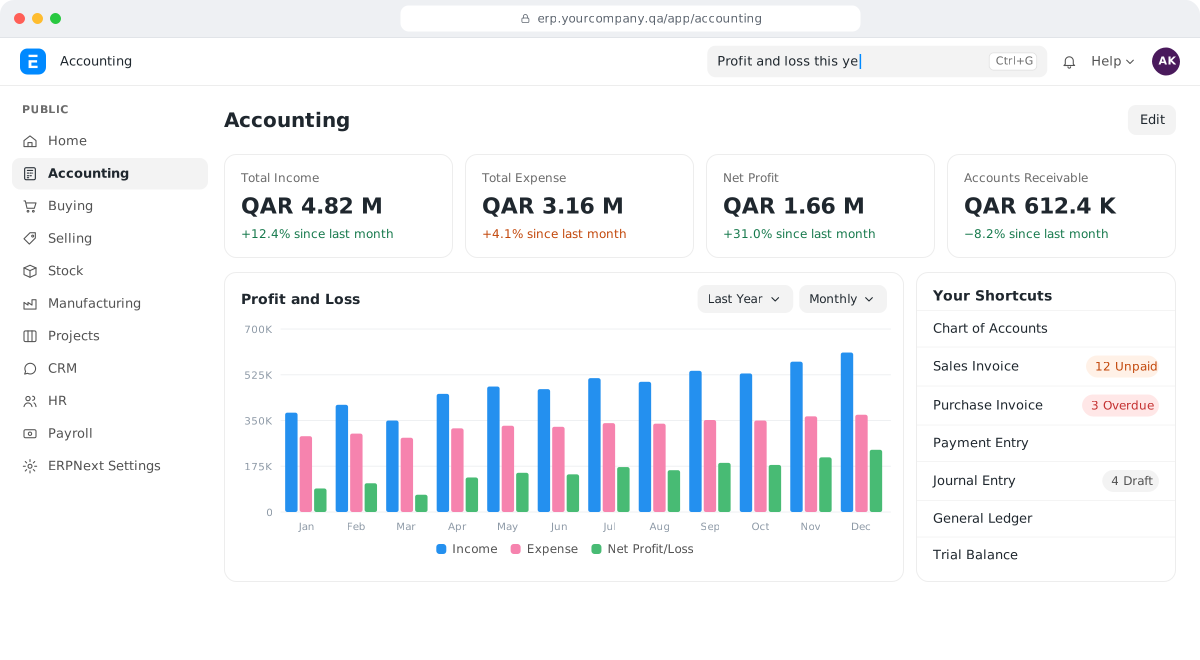
ERPNext accounting software covers invoices and payments, post-dated cheques, receivables and payables, cost centres and budgets, several companies and financial reports. Sales, purchasing, stock and payroll post to the same ledger, so finance stops re-entering what other teams already recorded.
Invoices and payments
Sales and purchase invoices, payments and journal entries, each linked to the order or delivery behind it.
Post-dated cheques
Enter cheques one by one or in bulk, follow each until it clears and handle bounced cheques.
Receivables and payables
Customer and supplier balances, ageing and statements of account, always up to date.
Cost centres and budgets
Track spending by cost centre, project or event, and see what is left in the budget before you spend.
Multi-company
Several companies in one system, with intercompany transactions and a company switcher for your team.
Financial reports
General ledger, trial balance, profit and loss, balance sheet and cash book, plus reports built for your management.
Why does ERPNext accounting suit companies in Qatar?
Akwad Programming sets up ERPNext accounting for companies in Qatar with post-dated cheques, retention on contracting invoices, several companies and currencies, and reports in Arabic and English.
- Post-dated cheques and bulk cheque entry
- Retention on contracting invoices
- Project and cost-centre profitability
- Multi-company and multi-currency accounts
- Reports and print formats in Arabic and English
What does ERPNext accounting do for a company in Qatar?
ERPNext accounting creates the accounting entries for sales invoices, supplier invoices, stock receipts and payroll by itself, so finance no longer copies them into a separate accounting program. In many companies in Qatar, sales sit in one file, purchases in another and the accounts in a third. Every month someone types the same numbers again, and every difference has to be chased by phone.
In ERPNext, each document posts to your books when it is approved. Open any entry and you can click through to the invoice, order or delivery behind it. Your accountant spends the day checking and approving, not typing.
- A sales invoice from ERPNext sales and CRM updates the customer balance and your income, and each delivery updates stock in ERPNext inventory management.
- A purchase receipt and supplier invoice from ERPNext procurement software update stock and the supplier balance.
- The monthly payroll from ERPNext HR and payroll posts salaries to the right expense accounts and cost centres.
Budgets work in the same place. Set a budget for each cost centre or project, and ERPNext can warn or stop a material request, purchase order or expense that goes over it, before the money is spent. Profit by project is covered on our project management software page, and retention on contracting invoices on our page on ERP for contracting companies in Qatar.
What happens at month end in ERPNext accounting?
At month end you reconcile the bank, review open balances and lock the period, all inside the system instead of across several spreadsheets. Because entries arrive during the month, most of the work is already done when the month closes.
A typical close in ERPNext looks like this:
| Step | What you do in ERPNext |
|---|---|
| Bank | Import the bank statement and match it to your payments in the Bank Reconciliation Tool |
| Customers and suppliers | Review the ageing reports and follow up overdue balances |
| Foreign currency | Revalue open foreign-currency balances at the month-end rate |
| Lock | Close the accounting period so no one can add, change or cancel entries dated inside it |
| Report | Print the trial balance, profit and loss and balance sheet |
Locking matters. Once you close a period for the document types you choose, the numbers you sent to management stay as they were. At year end, a year-end closing entry moves the year’s profit or loss to your equity account. To read the results, our guide to the financial ratios report in ERPNext explains what each ratio tells you and how to check it.
How do we handle post-dated cheques and bank reconciliation?
We set up cheque tracking in ERPNext from the day you receive a cheque until it clears or bounces. Cheques are still a normal part of business in Qatar, so each one is recorded with its number and date, and your team can enter a batch of cheques at once instead of one by one. We set up post-dated cheques and bulk cheque entry for Asklan for Trading and Agriculture Company.
When the bank statement arrives, you import it and match each line to the payment in ERPNext. Lines whose reference number matches the payment can be matched automatically; the rest you match by hand on the same screen. A bounced cheque is reversed in the system, so the customer’s balance is right again and your collector knows whom to call.
Customer statements no longer need to be prepared one by one either. ERPNext can build a PDF statement for many customers at once and email them every week, month or quarter.
Can we run several companies and currencies in one system?
Yes. ERPNext keeps separate books for each company in one system, and your team switches between companies without logging in again. This suits family groups and holding companies in Qatar that run trading, contracting and services under different commercial registrations, including many trading and distribution companies.
- Sales between your companies: a sales invoice in one company can create the matching purchase invoice in the other, which your team checks and approves.
- Group reports: the consolidated financial statement shows each company side by side with a group total. Balances between your own companies are removed with a journal entry, so we agree with you during setup how to treat them. Our guide to ERPNext journal entry types explains which entry to use for what.
- Currencies: invoices and payments can be in US dollars, euros or your supplier’s currency, while your books stay in Qatari riyals.
Can we keep Arabic and English invoices and reports?
Yes. ERPNext works in Arabic or English, and each user chooses their own language. We design your invoices, receipts, statements and reports with both languages on the same page, with your logo, stamp and signatures where you need them. Print formats are set up once, so every invoice comes out the same way. What Qatar has announced so far about e-invoicing, and what you can prepare now, is in our guide to e-invoicing in Qatar.
Your Arabic-speaking accountant and your English-speaking auditor can work in the same system, each in their own language, and see the same numbers.
How do we move from Excel or our old accounting software?
We move your data in stages and check every total with your team before go-live. You don’t have to clean everything first; we tell you what we need and in which format. Coming from Odoo? See Odoo alternative in Qatar: how companies move to ERPNext. If you are still choosing a system, our comparison ERPNext vs Odoo in Qatar: how to choose sets the two side by side.
- Chart of accounts and cost centres: we map your current accounts to ERPNext and keep the account codes your team already knows.
- Customers, suppliers and items: imported from your files.
- Opening balances: each unpaid customer and supplier invoice comes in as its own open invoice, so ageing and statements are correct from the first day. Other balances go in through an opening journal entry.
- Fixed assets: imported with the depreciation already booked; see ERPNext fixed asset management.
- Checks: we compare the trial balance, customer balances and supplier balances in ERPNext with your old figures, and fix any difference before you start.
How does Akwad Programming set up ERPNext accounting in Qatar?
Akwad Programming sets up ERPNext accounting with your finance team from our office in Doha, moves your data, trains your users and supports you after go-live. We work in Arabic and English, and we start from your chart of accounts and the reports your management reads, not from a generic template. Accounting is one module of the ERP system we set up for companies in Qatar. The full process is on our ERPNext implementation service page.
- Setup: chart of accounts, cost centres, budgets, approvals and reports.
- Data and checks: opening balances reconciled with you before your first live month.
- Training: two 2-hour sessions per module, plus a session for managers on reports.
- Hosting: in Microsoft Azure’s data centre in Qatar, so your financial data stays in the country, or on AWS if you prefer. Backups run every day and are kept for 30 days, with a copy in a second location.
- After go-live: every system we deliver comes with a free warranty from delivery, and existing clients reach our support team at support@akwad.qa. We test every upgrade on a separate test copy first, before it reaches your live system.
ERPNext has no licence fees, so adding another accountant or approver doesn’t add a licence cost. What the rest of an ERP budget goes on is explained in our guide how much an ERP system costs in Qatar.
Three steps to go live with ERPNext accounting
- 01
Review your accounts
We review your chart of accounts, cost centres, approval rules and the reports your finance team needs.
- 02
Set up and move your data
We set up ERPNext accounting and import your opening balances, customers and suppliers, then check them with you.
- 03
Train and go live
We train your finance team, agree with you how we'll check everything works, and support you after go-live.
ERPNext accounting projects we’ve delivered in Qatar

Asklan for Trading and Agriculture Company: Trading & agriculture · ERPNext
Retention accounting, post-dated cheques and project profitability
- Ellora Group
Ellora Group: Trading · Multi-company ERPNext
Multi-company accounts, intercompany sales and post-dated cheque clearance

Qatar Athletics Federation: Sports · ERPNext + mobile app
Budgets by event, multi-currency expenses and multi-company accounts
Related guides
- E-Invoicing in Qatar: What Businesses Should Prepare
E-Invoicing in Qatar: What Businesses Should Prepare: Guide · E-invoicing
What has been officially announced so far, and how to get your invoices ready now
ERPNext accounting: common questions
Can ERPNext print cheques for our suppliers?
Yes. We set up a cheque print format that matches your bank's cheque book, so the payee, amount in words and date print in the right places from the payment.
Can ERPNext accounting show the profit of each branch?
Yes. Each branch can have its own cost centre, so the profit and loss report shows every branch on its own and the company as a whole.
How much does accounting software on ERPNext cost in Qatar?
There are no licence fees for ERPNext. The cost depends on how many companies and currencies you run, how many balances and open invoices we bring in, your cheque and invoice print formats, and the management reports you need. We give you a fixed quote after a short review of your needs.
Can we limit what each accountant can see and change in ERPNext?
Yes. Roles and permissions decide which companies, documents and reports each user can open, and an approval can be required before an entry is posted.
Can ERPNext post recurring entries, such as monthly rent?
Yes. A journal entry or invoice can repeat on a schedule you set, such as every month, so rent, service fees and subscriptions are posted on time without being typed again.
Can ERPNext handle petty cash for each branch?
Yes. Each branch can have its own cash account, so petty cash expenses are recorded against that branch's cash and cost centre, and the cash book shows what is left at any time.
Can our external auditor work in ERPNext?
Yes. We can create a user for your auditor who can view entries and reports without being able to change them.
Ready to close the month without spreadsheets?
Tell us how many companies you run and the reports you need, and we'll show you ERPNext in a demo.