Manufacturing software on ERPNext: bills of materials, production planning and work orders
Akwad Programming sets up production planning and manufacturing software on ERPNext for factories and workshops in Qatar, from our office in Doha. Bills of materials, production plans, work orders and job cards live in one system, and raw materials, stock and costs update as your team records production.
What does manufacturing software on ERPNext include?
ERPNext manufacturing software covers bills of materials, production planning, work orders, job cards, quality inspection and production costs, all linked to inventory, purchasing and accounting.
Bills of materials
Multi-level BOMs with raw materials, sub-assemblies, operations and the cost of each product.
Production planning
Plans from sales orders or forecasts that calculate the materials and time each run needs.
Work orders
Work orders that reserve materials, move them to the production floor and post finished goods to stock.
Job cards and operations
A job card for each operation and workstation, with time and quantities recorded on the floor.
Quality inspection
Inspections on incoming materials and finished goods, with quality goals and non-conformance records.
Production costs and reports
Actual material and operating cost for each work order, with production and downtime reports.
Why does ERPNext production planning suit companies in Qatar?
Set up by Akwad Programming, ERPNext production planning suits manufacturers in Qatar because sub-assemblies, purchasing and factory payroll with WPS files run in one system.
- Sub-assemblies made in advance and taken from stock
- Material requests and purchasing driven by the production plan
- Factory payroll and WPS files in the same system
- Multi-company setup for industrial groups
- Production documents in Arabic and English
How does production planning (MRP) in ERPNext decide what to make and what to buy?
ERPNext production planning and MRP (material requirements planning) software takes your open sales orders or material requests, works out the sub-assemblies and raw materials they need, subtracts what you already have, and raises requests only for the shortfall. Planning no longer depends on one person’s spreadsheet and their memory of what is in the warehouse, and the plan is the same for production, stores and buying.
From one plan you can:
- create work orders for the finished goods and for sub-assemblies you make in-house;
- send sub-assemblies you don’t make to a subcontractor, or buy them through ERPNext procurement software;
- raise material requests for raw materials that are short, or move them from another warehouse that has stock.
Because the plan counts stock on hand and open orders in ERPNext inventory management, your buyer doesn’t order material that is already in the warehouse or on its way.
How does a work order move materials from the warehouse to finished goods?
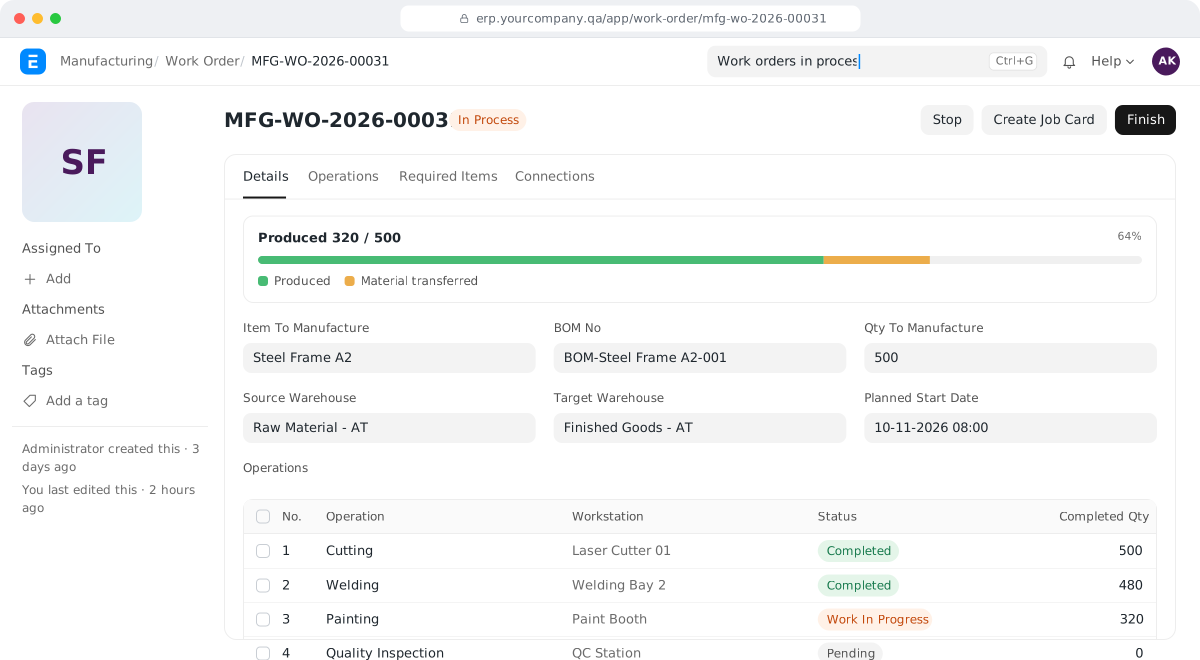
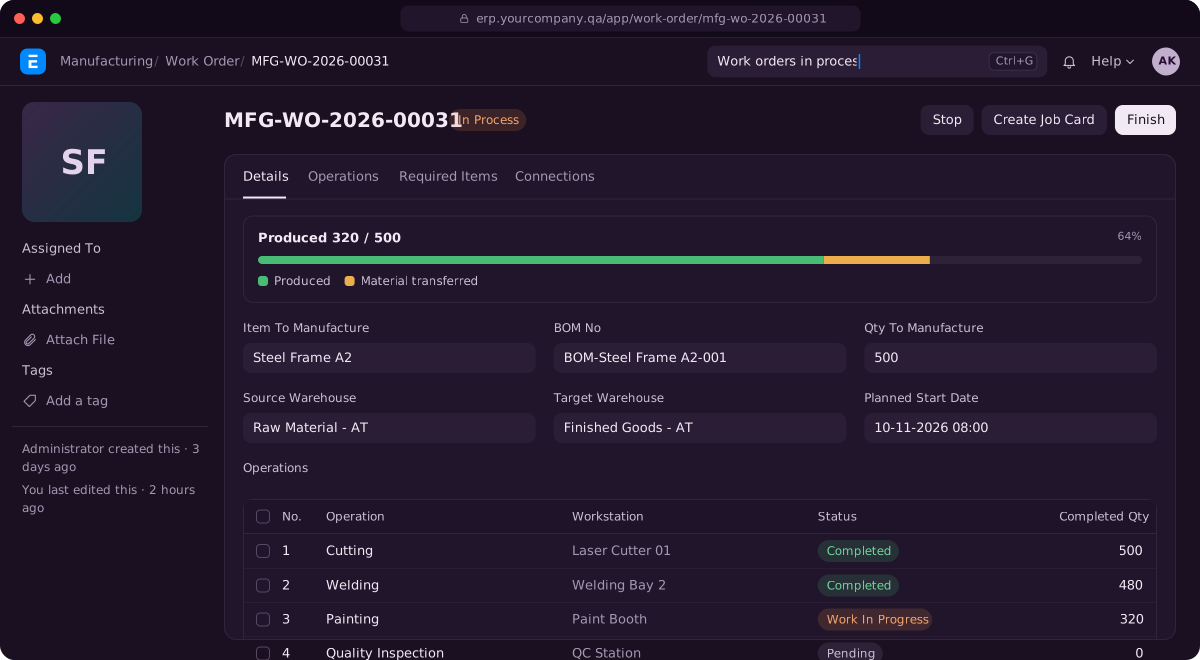
A work order reserves the materials in the bill of materials, records their transfer to the production floor, and adds finished goods to stock when production is reported. Your warehouse and production teams work from the same document, so the warehouse knows what to issue, production knows what it has, and finance knows what was used.
| Step | What happens in ERPNext |
|---|---|
| Release | The work order lists the materials and quantities needed for the run |
| Transfer | The warehouse issues materials to the work-in-progress warehouse |
| Produce | Production reports the finished quantity; materials are consumed and finished goods enter stock |
| Close | Any leftover material goes back to the warehouse, and the work order shows what was actually used |
Materials can be consumed according to the bill of materials, or according to what was actually transferred. We set this with you depending on how closely your floor follows the recipe.
How do job cards record each operation on the shop floor?
When a product goes through several operations, ERPNext creates a job card for each operation and workstation, and the operator or supervisor records start and finish times and the quantity completed. Supervisors stop collecting paper sheets at the end of each shift and typing them in, and the work order shows its progress as each operation finishes.
Each job card is assigned to an employee. Stoppages such as machine breakdowns or waiting for material can be recorded as downtime, so you see how much time was lost and why.
How does ERPNext calculate the planned and actual cost of each product?
ERPNext calculates the planned cost of each product from its bill of materials and operations, then records the actual material and operating cost on each work order. You compare the two and see where a run cost more than it should, instead of finding out from the month-end profit in ERPNext accounting software. The cost is built from:
- Materials: valued from stock at their real purchase cost, including freight and customs added on receipt.
- Operations: time on each workstation, valued at that workstation’s hourly rate.
- Scrap: scrap and waste listed on the bill of materials can be received into a scrap warehouse with its value.
- Up-to-date costs: bill of materials costs can be updated as purchase prices change.
Food producers work the same way, because a recipe is a bill of materials. For Widam Food, we digitised part of the meat production flow.
How do quality inspections work in ERPNext manufacturing?
You define inspection templates with the parameters to check, and ERPNext can require an inspection before raw materials are received or finished goods leave. A failed inspection is recorded against the batch or receipt, so a problem is traced back to the supplier or the production run that caused it, not argued about later.
For quality management beyond inspections, ERPNext also has quality goals, procedures and non-conformance records. Your team records a problem, its cause and the corrective action in the same system as production.
How do we set up bills of materials, items and opening stock when moving to ERPNext manufacturing?
We set up and test ERPNext with a few products and production runs that represent your work, then roll it out in stages while the factory keeps running. Nobody has to stop the line for the system. The same staged approach works whether your data is in Excel, Odoo or another system; for Odoo, see Odoo alternative in Qatar: how companies move to ERPNext.
- Items and warehouses: raw materials, sub-assemblies and finished goods, with units, and warehouses for raw material, work in progress, finished goods and scrap.
- Bills of materials: built with your production team, product by product, starting with your main products.
- Opening stock: counted and entered by warehouse.
- Pilot and roll-out: we run real orders through one product line, fix what doesn’t fit, then extend to the rest of the factory.
How does Akwad Programming set up ERPNext manufacturing in Qatar, from consulting to go-live?
Akwad Programming offers manufacturing ERP consulting from our office in Doha: we document your products, bills of materials and production steps with you, set up ERPNext manufacturing, train your production, warehouse and finance teams, and support you after go-live. We work in Arabic and English with everyone from the factory floor to finance. Manufacturing is one module of the ERP system we set up for companies in Qatar. For the sector view, from customer orders to factory payroll, see our page on ERP for factories and workshops in Qatar; the full process is on our ERPNext implementation service page.
- Setup: items, warehouses, bills of materials, operations, workstations, quality checks and production reports.
- Connected systems: factory payroll and WPS salary files from ERPNext HR and payroll, with purchasing and accounting in the same system as production.
- Training: two 2-hour sessions per module, plus a session for managers on reports.
- Hosting: in Microsoft Azure’s data centre in Qatar, so your data stays in the country, or on AWS if you prefer. Backups run every day and are kept for 30 days, with a copy in a second location.
- After go-live: a free warranty from delivery, then support through support@akwad.qa. We test every upgrade on a separate test copy first, before it reaches your live system.
ERPNext has no licence fees, so adding supervisors and operators as users doesn’t add a licence cost. What the rest of an ERP budget goes on is explained in our guide how much an ERP system costs in Qatar.
Three steps to go live with ERPNext manufacturing
- 01
Map your production
We document your products, bills of materials, work steps and how materials move between warehouses and the floor.
- 02
Set up and test
We set up items, warehouses and BOMs, then test them with products and production runs that represent your work.
- 03
Roll out in stages
We train your production, warehouse and finance teams, agree with you how we'll check it works, then extend to the rest of the factory.
ERPNext manufacturing projects we’ve delivered in Qatar
- HyPack Paper and Plastic Industries
HyPack Paper and Plastic Industries: Paper & plastic manufacturing · ERPNext
Sub-assemblies consumed from stock, with work orders and production linked to finance and payroll
- AL Tawheed Engineering Workshop
AL Tawheed Engineering Workshop: Engineering workshop · ERPNext
Bills of materials, work orders, quality checks and production planning, linked to client orders and purchasing

Widam Food: Food · Frappe platform
Part of the meat production flow digitised, within one of our large projects
ERPNext production and manufacturing: common questions
Can ERPNext handle multi-level bills of materials?
Yes. A product can include sub-assemblies with their own BOMs, and we set up whether each one is made inside the work order or taken from stock.
Can ERPNext handle recipes for food production in Qatar?
Yes. A recipe is set up as a bill of materials with its ingredients and quantities, and batch numbers and expiry dates can follow each production run from raw materials to finished goods.
Can operators record production on a tablet?
Yes. ERPNext runs in the browser, so operators and supervisors can open their job cards on a tablet at the workstation and record start, finish and quantities there.
Can we send part of the work to a subcontractor?
Yes. A subcontracting order records the raw materials you send to the subcontractor and the finished items you receive back, with their cost added to the item.
Can ERPNext print a label for each finished batch?
Yes. We design a label print format with the item name, batch number, production and expiry dates and a barcode, so the team can label finished goods as they come off the line and the warehouse can scan them later.
Can ERPNext schedule work around our machines' working hours?
Yes. With capacity planning turned on, ERPNext schedules each operation within the working hours of its workstation, so jobs are planned in the time actually available.
How much does manufacturing software on ERPNext cost in Qatar?
There are no licence fees for ERPNext. The cost depends on how many products and bills of materials we set up with you, how many operations and workstations you track, the quality checks, labels and production reports you need, and the data we move. We give you a fixed quote after a short review of your needs.
Ready to plan production in one system?
Tell us what you make and how many production steps each product goes through, and we'll show you ERPNext in a demo.